NULL in SQL: the three-valued logic behind silent bugs
TRUE, FALSE and UNKNOWN in practice: why NOT IN returns empty, how NULL behaves in comparisons, JOINs, aggregates, UNIQUE and CHECK, and when to use COALESCE, NULLIF and IS DISTINCT FROM. With PostgreSQL tests.

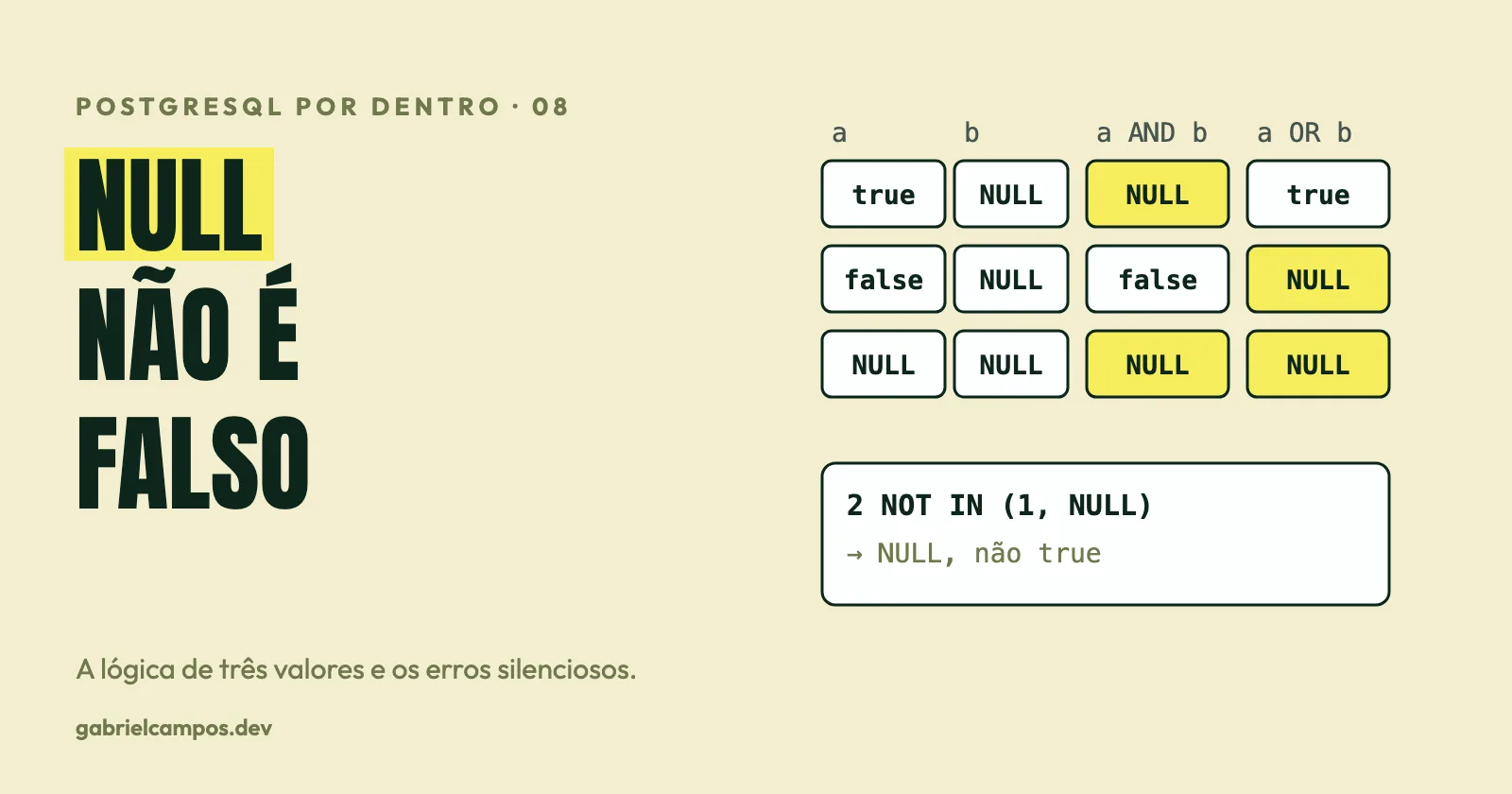
A query SELECT id FROM a WHERE id NOT IN (SELECT id FROM b) returned zero rows. Table a had ids 1, 2 and 3; table b had id 1 and a row with NULL. The result almost every developer would expect would be 2 and 3. The equivalent query with NOT EXISTS returned exactly 2 and 3. Neither raised an error.
It is this kind of behavior, with no exception, no warning, and a plausible result, that makes NULL the most underestimated source of silent bugs in SQL applications. This is the eighth article in the PostgreSQL Internals series, and the most conceptual one: what NULL is, how three-valued logic works and where it hides in day-to-day work.
This article is a study based on the official PostgreSQL documentation and on the Oracle manual (only for the comparison on empty strings). The examples were run on a disposable local PostgreSQL 17.10. Passages marked as opinion reflect my own reading. References are at the end.
What NULL is (and what it isn’t)
NULL is not a value: it is the absence of a known value. It is also not zero, not an empty string and not false. SQL’s logic treats NULL as “unknown”, and from that comes a consequence that changes everything: boolean expressions don’t have two possible results, but three.
| In PostgreSQL | Result |
|---|---|
'' IS NULL |
false |
0 IS NULL |
false |
length('') |
0 |
length(NULL) |
NULL |
This behavior (empty string different from NULL) is that of PostgreSQL and the SQL standard, but it is not universal: Oracle Database’s documentation states that the database “currently treats a character value with a length of zero as null”, and recommends not relying on it since it may change in future releases. So if you migrate code between databases, the question “is an empty string NULL?” has different answers.
Three-valued logic
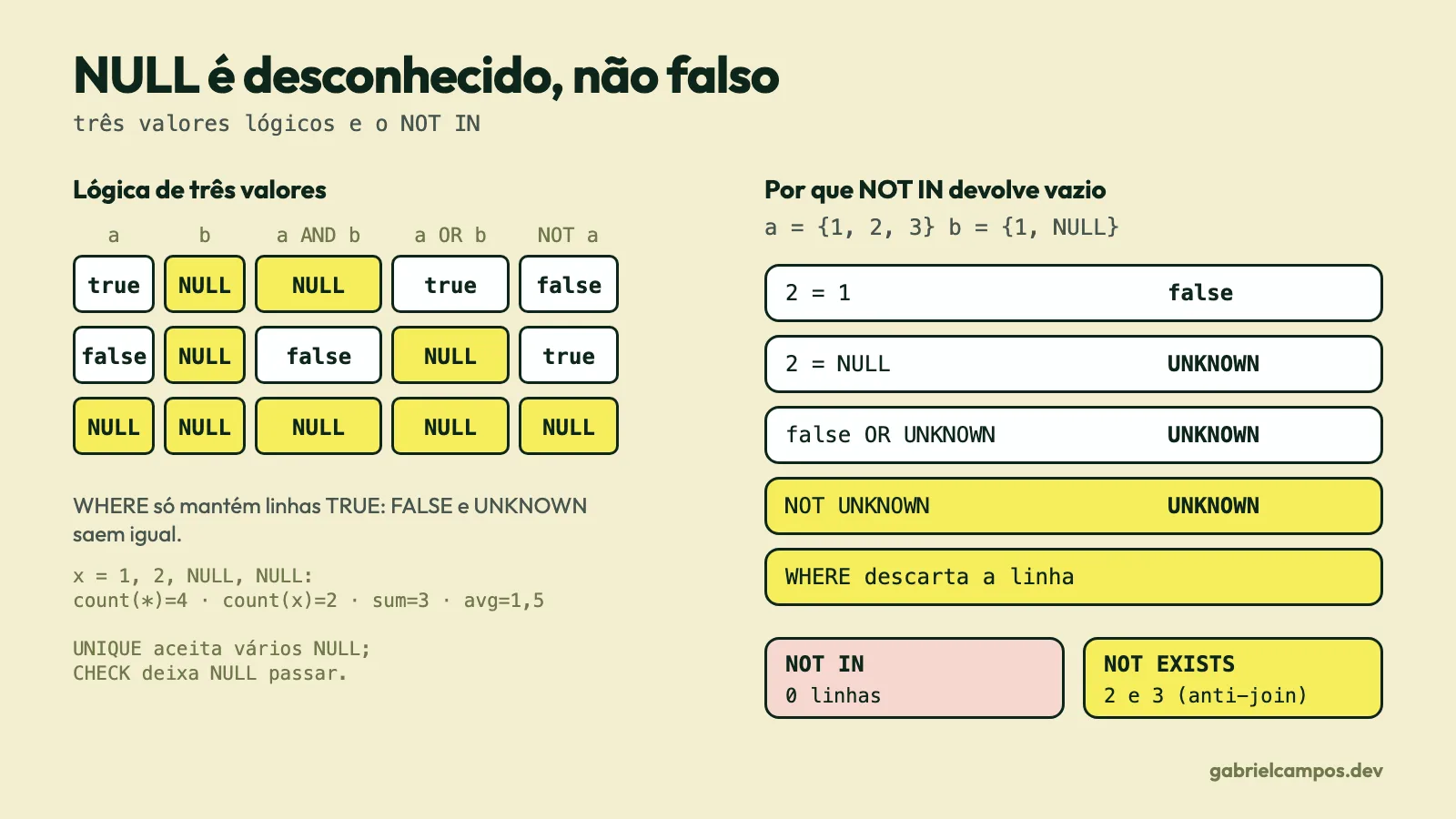
The SQL standard defines a three-valued result for predicates: TRUE, FALSE and UNKNOWN. In PostgreSQL, UNKNOWN is represented by NULL of type boolean. The truth tables are:
SELECT a, b, a AND b AS "a AND b", a OR b AS "a OR b", NOT a AS "NOT a"
FROM (VALUES (true,NULL::bool),(false,NULL),(NULL,NULL)) t(a,b);
a | b | a AND b | a OR b | NOT a
---+---+---------+--------+-------
t | ∅ | ∅ | t | f
f | ∅ | f | ∅ | t
∅ | ∅ | ∅ | ∅ | ∅(∅ represents NULL.) The rules follow from the reasoning “if I don’t know the value, is the result still determined?”:
TRUE AND UNKNOWN=UNKNOWN(depends on the unknown), butFALSE AND UNKNOWN=FALSE(it’s false either way).TRUE OR UNKNOWN=TRUE, butFALSE OR UNKNOWN=UNKNOWN.NOT UNKNOWN=UNKNOWN.
The second half of the rule is the one that explains the bugs: WHERE only keeps rows whose predicate is TRUE. FALSE and UNKNOWN rows are discarded alike. In classical logic, “not true” and “false” were the same thing; in SQL, they’re not.
Comparisons with NULL
The documentation is explicit: “ordinary comparison operators yield null (signifying ‘unknown’), not true or false, when either input is null. For example, 7 = NULL yields null, as does 7 <> NULL”. And it warns: “do not write expression = NULL because NULL is not ‘equal to’ NULL.”
SELECT NULL = NULL        AS eq,        -- NULL
       NULL <> NULL       AS neq,       -- NULL
       NULL IS NULL       AS isnull,    -- true
       1 IS DISTINCT FROM NULL      AS idf,   -- true
       NULL IS DISTINCT FROM NULL   AS idf0,  -- false
       NULL IS NOT DISTINCT FROM NULL AS indf; -- true
To compare while treating NULL as a comparable value, SQL has IS DISTINCT FROM and IS NOT DISTINCT FROM: “for non-null inputs, IS DISTINCT FROM is the same as the <> operator; however, if both inputs are null it returns false, and if only one input is null it returns true”.
PostgreSQL also has the transform_null_equals variable, which converts x = NULL into x IS NULL. The documentation describes it as compatibility for applications that expect this behavior and recommends fixing the applications to follow the standard. In other words: don’t turn it on.
The most common silent bug: <> discards NULL
-- orders: ok, canceled, NULL, ok
SELECT count(*)                                                    AS total,
       count(*) FILTER (WHERE status <> 'canceled')                AS different,
       count(*) FILTER (WHERE status IS DISTINCT FROM 'canceled')  AS idf
FROM orders8;
--  total | different | idf
--      4 |         2 |   3
Should “all orders that were not canceled” include the order with unknown status? It depends on the domain, but <> discards it without any warning. That was exactly the difference between 2 and 3 above. The same goes for NOT (status = 'canceled'), which also returned 2.
NOT IN versus NOT EXISTS
Back to the problem at the start. I reproduced the scenario with a = {1,2,3} and b = {1, NULL}:
SELECT id FROM a WHERE id NOT IN (SELECT id FROM b);          -- 0 rows
SELECT id FROM a WHERE NOT EXISTS (SELECT 1 FROM b WHERE b.id = a.id);  -- 2, 3
SELECT id FROM a WHERE id IN (SELECT id FROM b);              -- 1
Why? id NOT IN (1, NULL) is, by definition, NOT (id = 1 OR id = NULL). For id = 2: 2 = 1 is FALSE, 2 = NULL is UNKNOWN; FALSE OR UNKNOWN is UNKNOWN; NOT UNKNOWN is UNKNOWN; WHERE discards it. The documentation says: if “there are no equal right-hand values and at least one right-hand row yields null, the result of the NOT IN construct will be null, not true. This is in accordance with SQL’s normal rules for Boolean combinations of null values”.
Checking with literals:
 not_in_literal | not_in_found | in_not_found | in_found
2 NOT IN (1,NULL) -> ∅ 1 NOT IN (1,NULL) -> f 2 IN (1,NULL) -> ∅ 1 IN (1,NULL) -> tEXISTS, on the other hand, only tests whether there are rows: it never returns NULL, and NULLs inside the rows don’t affect the result. The planner reflects the difference in semantics:
-- NOT IN:   Seq Scan on a  /  Filter: (NOT (ANY (id = (hashed SubPlan 1).col1)))
-- NOT EXISTS: Hash Anti Join  (Hash Cond: (a.id = b.id))
NOT EXISTS becomes an anti-join (here, Hash Anti Join); NOT IN with a subquery stays as a filter with a SubPlan (here, “hashed”), with higher cost and risk on large tables. (In my tests the tables were tiny; I’m not making a performance claim, just showing the structural difference in the plan.)
Recommendations:
- For “is not in”, use
NOT EXISTS(orLEFT JOIN ... WHERE b.id IS NULL, taking care withIS NULLon columns that may be null in tablebitself). - For literal lists in
NOT IN, make sure no entry isNULL(common when the list comes from an application variable). - If the subquery column can be null and you want
NOT IN, filter:NOT IN (SELECT id FROM b WHERE id IS NOT NULL).
NULL in JOINs
Equality join conditions never match NULL with NULL:
-- j1: (1,'a'), (NULL,'b');  j2: (1,'c'), (NULL,'d')
SELECT j1.x, j2.y FROM j1 JOIN j2 ON j1.k = j2.k;
-- a | c                              (only the pair with k = 1)

SELECT j1.x, j2.y FROM j1 FULL JOIN j2 ON j1.k = j2.k ORDER BY 1,2;
-- a | c    b | ∅    ∅ | d            ('b' and 'd' don't find each other)

SELECT j1.x, j2.y FROM j1 JOIN j2 ON j1.k IS NOT DISTINCT FROM j2.k ORDER BY 1;
-- a | c    b | d
IS NOT DISTINCT FROM joins nulls to each other, but it has a cost: in my test, WHERE v IS NOT DISTINCT FROM 500 on a column with a B-tree index became a Seq Scan with a NOT (v IS DISTINCT FROM 500) filter, whereas WHERE v = 500 used an Index Scan. For the specific case where you want “equal, or both null”, the form (a = b OR (a IS NULL AND b IS NULL)) can be friendlier to the planner in some scenarios; measure in your case.
LEFT JOIN: the filter in WHERE cancels the LEFT
-- cust: ana, bia;  ord: (10, cust 1, 'paid')
SELECT c.name, o.id FROM cust c LEFT JOIN ord o ON o.cust_id = c.id WHERE o.st = 'paid';
-- ana | 10                         (bia vanished)

SELECT c.name, o.id FROM cust c LEFT JOIN ord o ON o.cust_id = c.id AND o.st = 'paid';
-- ana | 10    bia | ∅
For the cust rows with no match, o.st is NULL; NULL = 'paid' is UNKNOWN; WHERE discards it. The LEFT JOIN became, in practice, an INNER JOIN. Conditions on the “optional” side’s table belong in the ON.
Aggregates, GROUP BY, DISTINCT and ORDER BY
Aggregates ignore NULL, with one exception:
-- v.x = 1, 2, NULL, NULL
SELECT count(*) AS count_star, count(x) AS count_x, sum(x) AS sum_x,
       avg(x) AS avg_x, avg(coalesce(x,0)) AS avg_coalesce
FROM v;
--  count_star | count_x | sum_x | avg_x  | avg_coalesce
-- 4 | 2 | 3 | 1.5 | 0.75count(*)counts rows;count(x)counts non-null values.avg(x)divides by 2, not by 4. If the “correct” thing for your business is to treat absence as 0, the average is 0.75, not 1.5. It is a domain decision that SQL doesn’t make for you.sumof an empty set, or only nulls, returnsNULL, not 0 (SELECT sum(x) FROM v WHERE falsereturnedNULL).bool_and/bool_oralso ignore nulls:bool_andof(true, NULL)gavetrue.array_aggincludes the nulls ({canceled,ok,ok,NULL}),string_aggignores them (canceled,ok,ok).
GROUP BY and DISTINCT treat NULLs as equal to each other (a single group of nulls): the opposite of the = comparison rule. count(DISTINCT x), on the other hand, ignores nulls, like the other aggregates (cd = 2 in the test).
Ordering: PostgreSQL treats NULL “as if larger than any non-null value”. ORDER BY x puts nulls last (NULLS LAST is the default for ASC); ORDER BY x DESC puts them first. Use NULLS FIRST or NULLS LAST to be explicit. This is a PostgreSQL implementation choice, and other databases may sort nulls differently by default, so don’t depend on the default in portable code.
UNIQUE, CHECK, foreign keys and NULL
UNIQUE. “By default, two null values are not considered equal in this comparison. That means even in the presence of a unique constraint it is possible to store duplicate rows that contain a null value in at least one of the constrained columns.” In the test:
CREATE TABLE u1 (email text UNIQUE);
INSERT INTO u1 VALUES (NULL),(NULL),(NULL);      -- ok, 3 rows

CREATE TABLE u3 (a int, b int, UNIQUE (a,b));
INSERT INTO u3 VALUES (1,NULL),(1,NULL);         -- ok, 2 rows

CREATE TABLE u2 (email text UNIQUE NULLS NOT DISTINCT);
INSERT INTO u2 VALUES (NULL);                    -- ok
INSERT INTO u2 VALUES (NULL);
-- ERROR:  duplicate key value violates unique constraint "u2_email_key"
NULLS NOT DISTINCT (PostgreSQL 15 onward, per that release’s notes; the constraints page doesn’t indicate the version) makes the constraint treat nulls as equal. The default behavior (distinct nulls) is PostgreSQL’s documented one; NULLS NOT DISTINCT is the option to change it. Be careful with portability: other databases have their own behaviors for unique indexes with nulls, and I didn’t test them here.
Two typical mistakes: thinking UNIQUE (tax_id) prevents duplication of “no tax ID”, or that UNIQUE (tenant_id, email) prevents two records with a null email in the same tenant. For “at most one per tenant, even if absent”, you need NULLS NOT DISTINCT or a partial index.
CHECK. “A check constraint is satisfied if the check expression evaluates to true or the null value.” That is why CHECK (v > 0) accepted INSERT INTO chk VALUES (NULL). To forbid nulls, you need NOT NULL.
PRIMARY KEY implies NOT NULL (the INSERT of NULL failed with null value in column "id" ... violates not-null constraint).
Foreign key. The default is MATCH SIMPLE: “a row with any referencing column null doesn’t have to satisfy the foreign key”. I inserted (1, NULL) into child8 and it was accepted without a parent. To require the reference, declare the column NOT NULL. In composite keys, MATCH FULL prevents the mix of nulls and non-nulls.
COALESCE, NULLIF and CASE
COALESCE(a, b, ...)returns the first non-null argument; the others aren’t evaluated. It is the tool for default values on reads:COALESCE(discount, 0).NULLIF(a, b)returnsNULLifa = b, otherwisea. Two classic uses: avoiding division by zero (x / NULLIF(y, 0)) and converting sentinels intoNULL(NULLIF(field, '')).CASE WHEN: aWHENwhose condition isUNKNOWNcounts as not satisfied. In my test,CASE WHEN status = 'ok' THEN 'A' WHEN status <> 'ok' THEN 'B' ELSE 'C' ENDsent theNULLto theELSE(group ‘C’), which is usually the desired behavior, but should be a conscious one.- “Strict” operators and functions propagate
NULL:1 + NULL,'a' || NULLreturnNULL, butconcat('a', NULL)returns'a'. Even within PostgreSQL, different functions treat nulls differently; read the function’s documentation.
Careful with COALESCE in WHERE. WHERE coalesce(v, 0) = 500 didn’t use the index on v in my test (Seq Scan with Filter: (COALESCE(v, 0) = 500)). If you need this, create an index on the expression or rewrite the condition.
Bugs that go unnoticed in production
NOT INwith a subquery that can returnNULL→ empty result (above).WHERE col <> 'x'dropping rows wherecolis null.LEFT JOIN+ a filter in theWHEREon the optional table → becomesINNER JOIN.- Average, sum and count with
NULLwithout an explicit domain decision. UNIQUEaccepting several nulls → “duplicates” the database considers distinct.- A
CHECKthat doesn’t protect against nulls. - Nullable columns in foreign keys, leaving legitimate orphan records.
- Comparison in applications:
null == nullistruein many languages, in SQL it’sUNKNOWN. In ORMs, filters withNoneneed to be translated toIS NULL;!= valuefilters inherit the<>problem. - Concatenation with
||producing an entirely null result when one field is null. - Nullable boolean. A null
booleancolumn has three states;WHERE NOT activedoesn’t return the nulls.
Opinion: the best defense I know is one of modeling, not of querying: if the absence of a value has no business meaning, declare
NOT NULL(with aDEFAULT, when it makes sense). Nullable columns should be justified exceptions, because each one multiplies the cases that everyWHERE,JOINand aggregate has to consider.
Practical recommendations
- Declare
NOT NULLby default; leave null only where “unknown” or “not applicable” is part of the domain. - Use
IS NULL/IS NOT NULLto test for nulls; useIS [NOT] DISTINCT FROMwhen you want nulls to compare to each other. - Prefer
NOT EXISTSoverNOT INwith a subquery. - Conditions on the optional table of a
LEFT JOINgo in theON. - Document, for each aggregation, how nulls should be handled (explicit
COALESCE). - If you need uniqueness that includes nulls, use
NULLS NOT DISTINCT(PostgreSQL 15+) or a partial index. - For
CHECK, remember that null passes; combine it withNOT NULL. - Test your queries with data that contains
NULL: it’s rare for test data to have it.
Frequently asked questions
Is NULL = NULL true?
No: it is NULL (unknown). Use IS NULL or IS NOT DISTINCT FROM.
Are an empty string and NULL the same thing?
In PostgreSQL and the SQL standard, no. In Oracle Database, a zero-length string is treated as null, according to Oracle’s own documentation.
NOT IN or NOT EXISTS?
NOT EXISTS, unless you guarantee the list has no NULL. The results differ when there are nulls, and so does the plan.
Can I have several rows with NULL in a UNIQUE column?
Yes, by default. To prevent it, use NULLS NOT DISTINCT (PostgreSQL 15+).
Are COUNT(column) and COUNT(*) the same?
Only if the column has no nulls: count(column) ignores nulls.
Does IS DISTINCT FROM use an index?
In my test with a regular B-tree index, no: it became a Seq Scan. Measure in your case.
Conclusion
NULL is the point where the programmer’s intent and SQL’s semantics diverge the most. It is not a PostgreSQL flaw: it is the three-valued logic of the SQL standard, with some implementation choices (ordering, empty strings, uniqueness) that vary between databases. Mastering UNKNOWN, IS DISTINCT FROM, NOT EXISTS and the rule “WHERE only lets TRUE through” eliminates most silent bugs. The next article covers another tool where the planner silently decides for you: CTEs, materialization and recursive queries.
References
This article is a study based on the sources below. Passages marked as opinion reflect my own reading. The experiments were run on a local PostgreSQL 17.10.
- PostgreSQL Documentation 17, 9.2. Comparison Functions and Operators
- PostgreSQL Documentation 17, 9.24. Subquery Expressions
- PostgreSQL Documentation 17, 5.5. Constraints
- PostgreSQL Documentation 17, 7.5. Sorting Rows (
ORDER BY) - PostgreSQL Documentation 17, 9.18. Conditional Expressions (
COALESCE,NULLIF) - PostgreSQL Documentation 17, 9.21. Aggregate Functions
- PostgreSQL Documentation 15, Release Notes: PostgreSQL 15 (
UNIQUE NULLS NOT DISTINCT) - Oracle Database SQL Language Reference, Nulls
Need technical support for your software architecture or systems?
I build resilient custom web systems, high-throughput API integrations, and performance diagnostics. Direct collaboration with the engineer, zero intermediaries.
Related Articles
CTEs, materialization and recursive queries in PostgreSQL: what the planner does with WITH
How PostgreSQL treats CTEs since version 12: inlining, MATERIALIZED and NOT MATERIALIZED, side effects, WITH RECURSIVE, SEARCH and CYCLE, cycles in graphs and the impact on the execution plan.
WAL, checkpoints and replication slots: how PostgreSQL protects your data (and how a forgotten slot fills the disk)
Write-Ahead Logging, full-page writes, checkpoints, crash recovery, streaming and logical replication, lag and WAL retention: how each piece works and how an abandoned replication slot becomes an incident. With experiments.